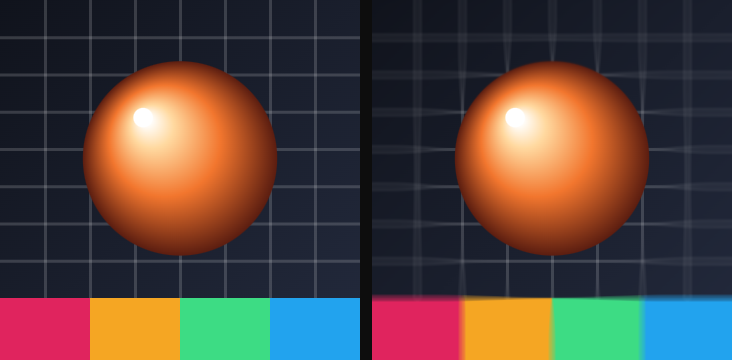
The four effects in the Blur group of the catalog, in the order the catalog lists them. Each entry gives the parameters as the card shows them, with their range and default; parameters behind ▸ Advanced are in a second table. How the stack, presets and the Advanced toggle work is on The effect stack.
01Box blur
Softens the picture by averaging each pixel with its neighbors in a fixed 5 × 5 pattern; Radius spreads that pattern wider.
Use it for: a quick soften, a frosted backdrop under a panel, taking the edge off a photo.
| Parameter | Range · default | What it changes |
|---|---|---|
| Radius | 0 – 20 · 2 | Spacing of the samples, in pixels. Small values blur smoothly; past about 6 the fixed pattern starts to show as ghosting, so stack two Box blurs for a very wide blur |

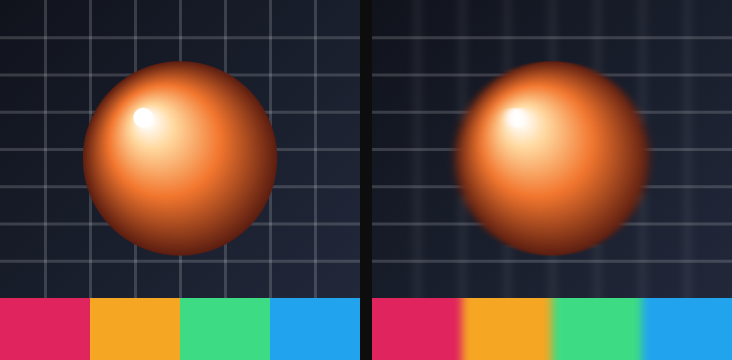
02Directional blur
Smears the picture along one direction — motion blur without anything moving.
Use it for: speed lines on a passing object, a streak under a title, softening only horizontally.
| Parameter | Range · default | What it changes |
|---|---|---|
| Angle | any angle · 0° | Direction of the smear; 0° is horizontal, 90° vertical |
| Distance | 0 – 200 · 20 | Length of the smear, in pixels |
Advanced
| Parameter | Range · default | What it changes |
|---|---|---|
| Mix | 0 – 1 · 1 | Blend between the original (0) and the full effect (1) |
03Radial blur
Blurs around a center point — either spinning around it or rushing outward from it.
Use it for: a zoom-in punch, a spinning wheel, drawing the eye to the middle of a hero image.
| Parameter | Range · default | What it changes |
|---|---|---|
| Mode | Spin / Zoom · Zoom | Spin smears along circles around the center; Zoom smears along lines out of it, more the farther from the center |
| Amount | 0 – 1 · 0.15 | Length of the smear |
Advanced
| Parameter | Range · default | What it changes |
|---|---|---|
| Center X | 0 – 1 · 0.5 | Horizontal position of the center across the layer (0 left, 1 right) |
| Center Y | 0 – 1 · 0.5 | Vertical position of the center (0 bottom, 1 top) |
| Samples | 4 – 32 · 16 | How many samples make up the smear; more is smoother and slower |
| Mix | 0 – 1 · 1 | Blend between the original and the full effect |

04Depth of field
Keeps a circle around a point sharp and blurs everything outside it, with a soft transition between the two.
Use it for: a tilt-shift look, focusing attention on one part of a photo, a background that stays out of the way.
| Parameter | Range · default | What it changes |
|---|---|---|
| Focus radius | 0 – 1 · 0.25 | Size of the sharp circle, as a fraction of the layer |
| Blur | 0 – 1 · 0.3 | How strong the blur is outside the circle |
| Feather | 0.01 – 1 · 0.2 | Width of the transition from sharp to blurred |
Advanced
| Parameter | Range · default | What it changes |
|---|---|---|
| Center X | 0 – 1 · 0.5 | Horizontal position of the sharp circle |
| Center Y | 0 – 1 · 0.5 | Vertical position of the sharp circle (0 bottom, 1 top) |
| Mix | 0 – 1 · 1 | Blend between the original and the full effect |